Ask a question of your business and carry the answer into a plan. Take a brief through a film, a 3D world or a working app. Put teams of agents and workflows to work across it all.
I built Pulse as one connected system: the intelligence to understand, the tools to create and the infrastructure to execute—with people and agents sharing data, context and control.
Scroll to open the section
Fig. 2 · Exploded axonometric
21 floors. One core.
Each floor is a product. They share data, context and tools, so work can move between them. Scroll to open the tower and see what happens on each floor.
Detail 1 / A-101 · Lobby
Pulse Home
Start with a question or a brief. Pulse brings the conversation, company context and tools together to make a deck, find an answer or plan the next steps.
0.1Composer
0.2Modes
0.3Widget canvas
0.4Snapshot
0.5Threads
0.6Voice
Detail 2 / A-101 · Level 1
Integrations
Bring a source into Pulse through an explicit data contract: discover its schema, review proposed fields, approve what belongs in the warehouse and follow the sync.
1.1Source catalogue
1.2Connection
1.3Schema discovery
1.4Field approval
1.5Sync history
Detail 3 / A-101 · Level 2
Data Platform
Connect the business once. Its data, definitions and relationships give people and agents a shared understanding, with each organisation’s information kept separate.
2.1Connectors
2.2Cloud SQL
2.3DuckDB
2.4Explorer & text to SQL
2.5Semantic layer
2.6Knowledge graph
Detail 4 / A-101 · Level 3
Knowledge Graph · Alpha
An alpha view of connected company context. Explore typed entities and their relationships, inspect the evidence behind a link and open the related source in Pulse.
3.1Entity archive
3.2Typed graph
3.3Relationships
3.4Provenance
3.5Source surface
Detail 5 / A-101 · Level 4
Analytics Studio
Ask a question in plain English, inspect the query and explore the answer. Dashboards, notebooks and maps work from the same business metrics.
4.1Dashboards
4.2Notebooks
4.3SQL worksheet
4.4Text to SQL
4.5Maps & spatial
Detail 6 / A-101 · Level 5
Computational Notebooks
Pulse’s computational workspace for business data. Query the organisation’s warehouse, explore data with Python and plots, and publish SQL queries as governed datasets others can use.
5.1SQL cells
5.2Result tables
5.3Python execution
5.4Plots
5.5Governed SQL datasets
Detail 7 / A-101 · Level 6
Spatial Analysis
Put business data in place. Bind location columns to a map, explore layers and hexes, filter time or category and inspect the records behind a selected feature.
6.1Column mapping
6.2Map layers
6.3Hex aggregation
6.4Time & category filters
6.5Feature inspection
Detail 8 / A-101 · Level 7
Files
Write, calculate and present in one workspace. People and agents edit the same documents, slides and grids, with version history built into the work.
7.1Docs
7.2Slides
7.3Grids
7.4Agents in the work
7.5Version history
Detail 9 / A-101 · Level 8
Tasks & Projects
Turn a brief into a plan, then follow it as a board, list, Gantt or calendar. People and agents work from the same tasks and deadlines.
8.1Daily briefing
8.2Quick add
8.3Board
8.4Gantt
8.5Agents on the board
Detail 10 / A-101 · Level 9
Workflows & Automations
Connect triggers, agents and tools into work that can be inspected and resumed. Branch by conditions, pause for a person’s approval and keep the run history with each outcome.
9.1Task status trigger
9.2Branches
9.3Agent & tool steps
9.4Approval pause
9.5Run history
Detail 11 / A-101 · Level 10
Collab & Meetings
Keep conversations, meetings and their transcripts together. The Agent Storms study explores the next step: investigate a question together and leave with something the team can use.
Give creative work a shared identity: palette, typography, voice and reference assets. Carry those choices into generation and review the work against shared brand rules.
12.1Palette
12.2Typography
12.3Voice
12.4Reference assets
12.5Consistency rules
Detail 14 / A-101 · Level 13
Campaign Studio
Carry a brief through audience selection, creative variants and review. Check channel readiness before launch, with approval and delivery receipts visible; provider availability determines what can ship. Compare experiments and observed performance to inform the next iteration.
13.1Brief
13.2Audience snapshot
13.3Creative variants
13.4Approval & readiness
13.5Launch receipts
Detail 15 / A-101 · Level 14
Script
Develop a film from logline to reel: screenplay, storyboard, shots and score. The sequence keeps its timing as the individual pieces take shape.
14.1Screenplay
14.2Storyboard
14.3Shots
14.4Score
14.5Reel
Detail 16 / A-101 · Level 15
Forge
Bring a prompt, capture or scan into a 3D world you can work with. Generate assets, reconstruct places, arrange scenes and build interactive experiences.
Working software · opens here · autoplay with pause
Detail 18 / A-101 · Level 17
App Studio
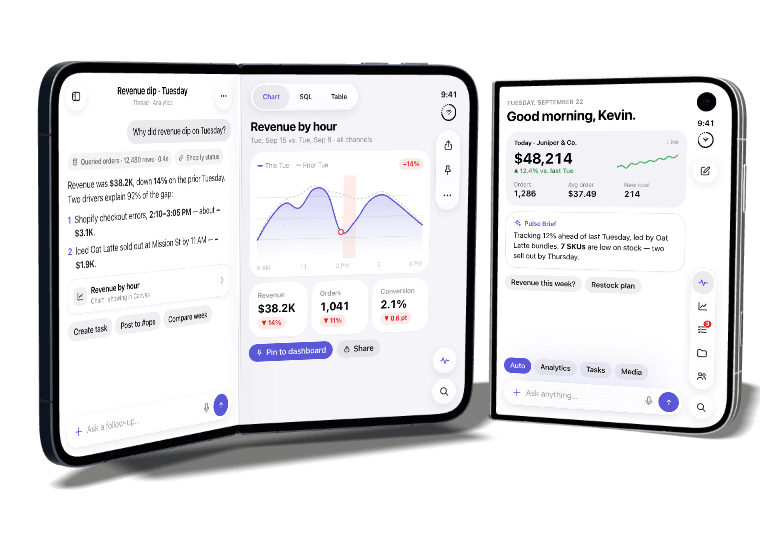
Loom turns a brief into an app with pages, data and a visual system. The device lab explores native interfaces, including Pulse on a folding phone and the separate Advocate study.
Give agents a defined job, connect them into workflows and inspect each run. Evaluation, approvals and schedules make the work visible and controllable.
18.1Specialists
18.2Workflows & playbooks
18.3Traces
18.4Evals
18.5Approvals
18.6Schedules
Detail 20 / A-101 · Level 19
Construct · Alpha
An alpha workspace connecting the building model, site and schedule. Explore the design, follow construction through time and keep drawings and project information together.
19.1Parametric model
19.24D schedule
19.3Drawings
19.4Site twin
19.5Site team
Detail 21 / A-101 · Level 20
Business Operations
Service work becomes a shared operating loop: triage tickets, assign an owner and service target, review a suggested response and record the resolution. Connected revenue and finance apps extend the same workspace.
20.1Ticket intake
20.2Owner & service target
20.3Response assistance
20.4Human review
20.5Resolution history
Detail 22 / A-101 · Roof
MCP & Platform Operations
The same product capabilities are available to agents through MCP. Tools run behind authenticated access, and releases move through a controlled deployment queue.
 Explore the environment ↗
 Explore the environment ↗